
In my quest for rapid campaign development, I came across an elegant idea called Six sided gaming: Hex magic on Greywulf’s Microlite d20 site. Subtitled “the lazy gamer’s guide to world building,” Six sided gaming suggests launching your campaign with an adventure in a single hex, then placing adventures in each of the six surrounding hexes, assigning hex terrain and encounters to match the adventures you’ve chosen. As the campaign grows, you simply populate the next “ring” of surrounding hexes, and so on and so on.
Defining the campaign by its adventures—instead of the other way round—is a great time-saver and perfect for the busy GM. With Greywulf’s kind permission, I’ve expanded the concept into a slightly different approach, but with the same time-saving goal. In Part 1 of Hex-based Campaign Design, we’ll start with a hex map and its terrain.
The Hex Map
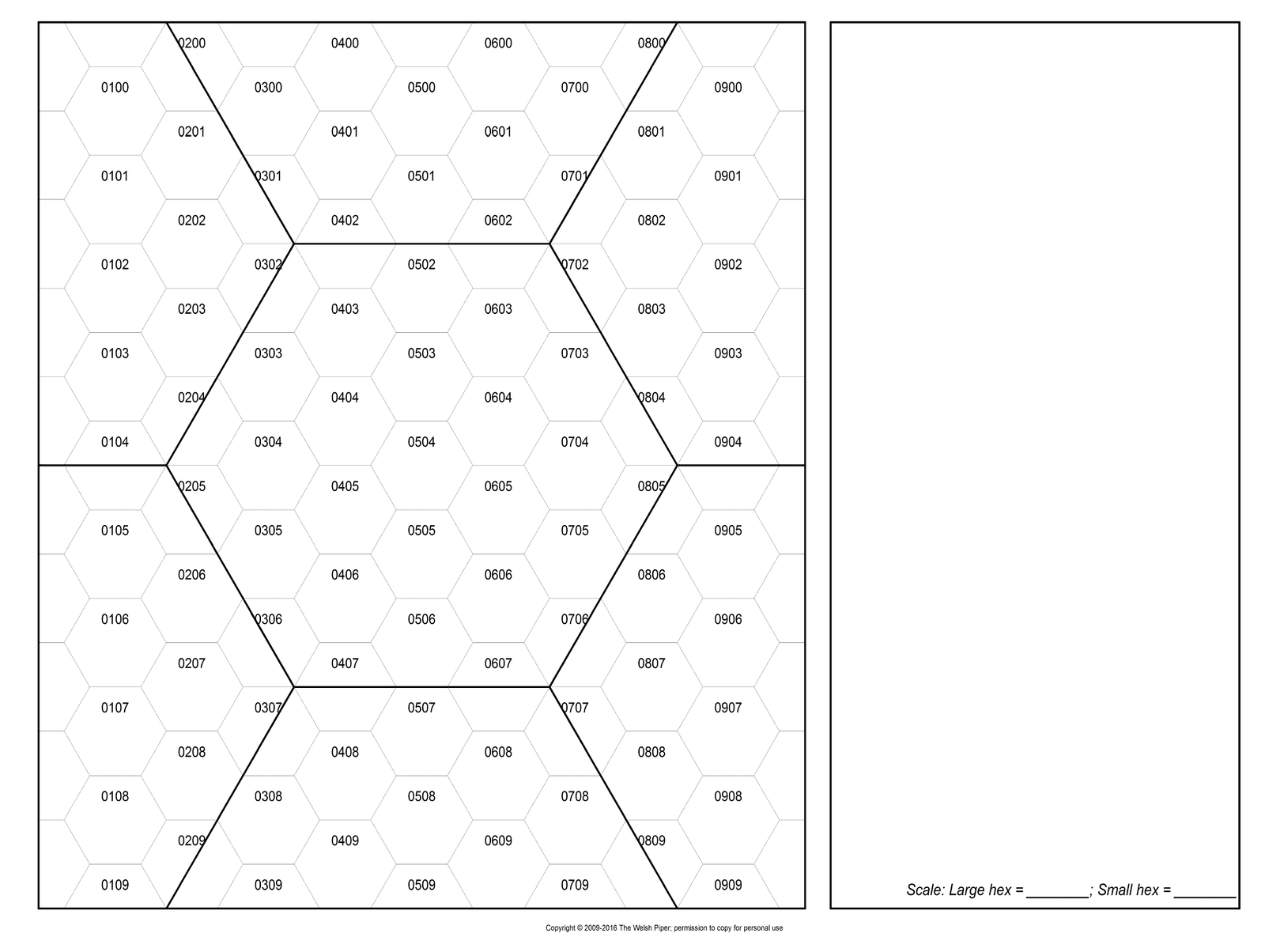
The underlying goal of Hex-based Campaign Design is to create a playable setting with as little effort as possible, so I recommend starting with a small map. The sub-hex map from our Hex Templates post (shown at right) is a good start, at a scale of 5 miles per sub-hex. This makes the template’s larger, atlas-scale, hexes 25 miles wide.
As you work on the sub-hex template, keep the large hex boundaries in mind, as it’ll make life easier when you expand the map and scale up to the atlas level.
N.B. The sub-hex template is now available in Hexographer format on the Hex Templates page.
Choose Climate
The first task is to determine climate. This affects the precise terrain you place in the next step. For example, if you’re placing forest, climate indicates what type of growth exists (e.g., conifers in cold climes, deciduous in temperate, or jungle in tropical areas). While not exact, the guidelines below are sufficient for our purposes:
- Arctic – Cold all year round
- Sub-arctic – Four distinct seasons, with a short, cool summer
- Temperate – Four distinct seasons, each of roughly equal duration
- Sub-tropical – Four distinct seasons, with a short, warm winter
- Tropical – Hot all year round
Assign Hex Terrain
Terrain placement does not rely on a random function, since it’s too easy to end up with unrealistic results (e.g., swamps next to deserts or mountains next to plains). Besides, who wants to roll dice for each hex anyway? Instead, I assign a primary terrain type to each atlas hex, then fill in the remaining sub-hexes with related terrain types. This lets you place terrain sensibly, but with the benefit of some speed.
Let’s begin with some basic terrain types:
- Water – lake, sea, or ocean; may be ice-covered in arctic/sub-arctic, or seaweed-choked in tropical/sub-tropical areas
- Swamp – marsh, bog, fen, or moor; will be partially frozen most or all of the year in arctic/sub-arctic climes
- Desert – arid land; sandy in tropical/sub-tropical, barrens in temperate, or snowfield in arctic/sub-arctic
- Plains – grassland, savannah, heath, or scrub; this is farmland in settled hexes, tundra in arctic
- Forest – woodland; mixed deciduous/evergreen in temperate, conifers in sub-arctic, or jungle in tropical/sub-tropical
- Hills – rocky ground, rough or broken land (up to 1,000′ above sea level)
- Mountains – peaks, ridges, and mesas (1,001′ or more above sea level)
Assign a terrain type of your choosing to the sub-hex at the centre of the atlas hex. This defines the atlas hex’s primary terrain type. The rest of the sub-hexes are broken down as follows:
- 18 whole hexes – assign 9 primary terrain, 6 secondary terrain, and 3 tertiary (or “wildcard”) terrain; distribute these as you see fit
- 12 half-hexes – there are 2 half-hexes along each edge of the atlas hex; assign any non-wildcard terrain as desired
Terrain type designations are pretty straight-forward:
- Primary (P) – the most prevalent terrain type in the atlas hex
- Secondary (S) – the second-most common terrain relative to the primary type
- Tertiary (T) – the third-most common terrain relative to the primary type
- Wildcard (W) – highly uncommon, but possible, terrain relative to the primary type
Secondary, tertiary, and “wildcard” options for each terrain type are shown on the following table:
| ATLAS HEX PRIMARY TERRAIN TYPE | |||||||
|---|---|---|---|---|---|---|---|
| Water | Swamp | Desert | Plains | Forest | Hills | Mountains | |
| Water | P | W | W | W | W | W | – |
| Swamp | W | P | – | W | W | – | – |
| Desert | W | – | P | W | – | W | W |
| Plains | S [1] | S | T | P [4] | S | T | – |
| Forest | T [2] | T | – | S | P [5] | W [8] | T [11] |
| Hills | W | – | S [3] | T | T [6] | P [9] | S |
| Mountains | – | – | W | – | W [7] | S [10] | P [12] |
|
|||||||
When all the sub-hexes are filled, you may move onto an adjacent atlas hex, whose primary terrain type is any valid terrain on the table above (i.e., primary, secondary, tertiary, or wildcard). If you need some polyhedral guidance, assign the following weights and roll 1d12:
| d12 Result | Adjacent Hex Terrain [1] |
|---|---|
| 1-6 | Primary |
| 7-9 | Secondary |
| 10-11 | Tertiary |
| 12 | Wildcard |
|
|
Example
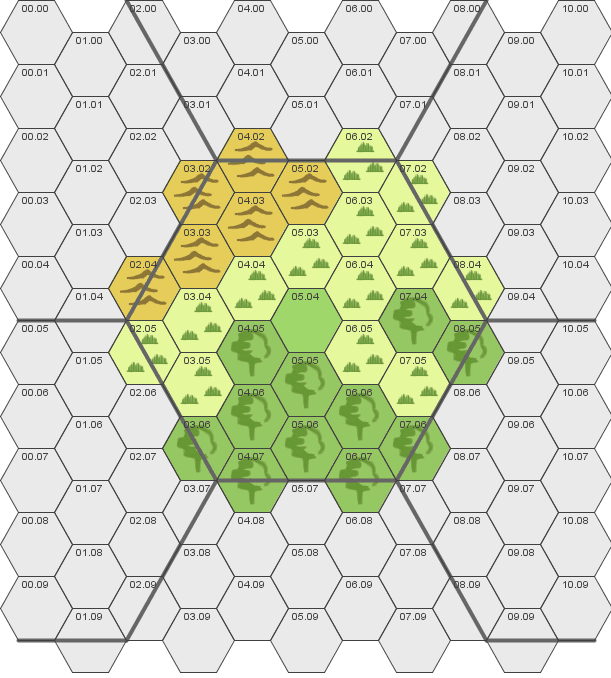
Let’s assume a temperate climate. I’ll assign “Plains” to the centre hex, which becomes the atlas hex’s primary terrain. According to the “Plains” column on the Terrain table, the remaining sub-hexes are assigned as:
- Plains (P) – 9 hexes
- Forest (S) – 6 hexes
- Hills (T) – 3 hexes (alternatively, you could sprinkle up to 3 wildcard hexes: water, swamp, and desert)
- Plains, Forest, or Hills – 12 half-hexes
I roll 1d12 for each of the six adjacent atlas hexes. Based on the primary terrain of “Plains” in the current hex, my results on the Adjacent Hex Terrain table are shown below:
- 1d12 = 4 (Primary = Plains)
- 1d12 = 11 (Tertiary = Hills)
- 1d12 = 9 (Secondary = Forest)
- 1d12 = 8 (Secondary = Forest)
- 1d12 = 5 (Primary = Plains)
- 1d12 = 8 (Secondary = Forest)
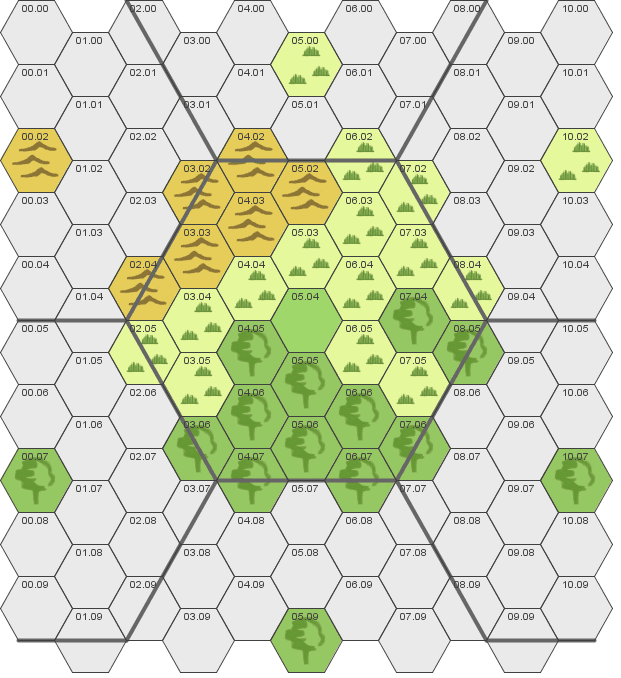
Using these primary terrain results, I can easily fill in the adjacent atlas hexes (cutting the distribution by 50% since only half of each adjacent atlas hex is shown). The image at right shows only the primary terrain assignments (based on the d12 results above) in the remaining atlas hexes on the map.
Scaling Up
The atlas hex on your map is 25 miles wide, which matches the hex scale on the Atlas template. When mapping on the atlas level, populate each hex with the primary terrain of each atlas hex on your sub-hex map.
However, the atlas template is very big, so I recommend that you transfer your sub-hex map to the Regional template first. This approach lets you fill in a Regional map rather quickly (there are roughly 7 sub-hex templates in one Regional map), and since this still represents a considerable amount of real estate, your setting should have plenty of space.
Either way, you can rather quickly expand your campaign using a series of sub-hex templates like the one you created above (all map scales noted in this post are located on our hex templates page).
Next Steps
The completed sub-hex template, scaled at 5 miles per individual hex, should be more than sufficient to get your campaign off to a good start (as a side note, if you’re incorporating the Mid-size Campaign approach, you’ve just created your map). In Part 2 of Hex-based Campaign Design, we’ll populate your hexes with some interesting things you can start building adventures around.
Nice! I like this, I’ve been working on maps lately and this will help for sure.
Thanks, kaeosdad. Be sure to tune in next week for Part 2!
I saw your posts over at Hexographer and thought you did a great job. I’m using the hex mapping to beta test a board game I’m designing, but your posts are very informative for the sandbox Swords and Wizardry campaign I’m running. Thanks for posting!
@Brenton Haerr : Thanks, Brenton. I checked out Wilderfast on your site, and the map looks cool. One thing I’m using Hexographer for is rapid campaign development – it’s a real timesaver and the maps come out looking great. Thanks again — I appreciate the links!
Great post!
This is an excellent article, and very useful. I wish you had included this (and part 2) in Chimera RPG 3.0 Basic, and hope that this material makes it into the Core Rules.
@Da’ Vane : The Campaign Creation section borrows from this concept in a more distilled fashion (e.g., creating the map and Points of Interest). Rest assured, though, you’ll see this again, with improvements…
Hi Erin,
I’m using your articles here in conjunction with Hexographer to experiment with world generation in a semi-random way. However, I’m a bit confused by the footnotes in terrain type table. For example – Footnote 2 says ‘66% Light Forest’. Does that mean there’s a 66% chance of any given forest hex to be ‘Light’, or that 66% of the forest hexes in that Atlas Hex will be light? Similarly, footnote 12 – Does every individual hex with a mountain in it have a 20% chance of having a dominating peak, a 10% chance of a pass and a 5% chance of a volcano?
I’m generally rolling for each individual hex, and 3 times for the mountain hexes, as I’m happy for that level of randomness atm, but I’m curious as to what you intended the footnotes to mean.
Thanks for creating the hexographer templates and writing these articles btw, they’re a great help in providing a structure to work with!
@James : Your first interpretation is correct–roll separately for each Regional hex. For example, if the Atlas Hex’s Primary Terrain is Water, then Forest is a Tertiary terrain type. Each of the 3 recommended forest hexes has a 66% chance of actually being “light forest.” Same with the mountains–in a Mountain Atlas Hex, each of the 9 suggested mountain hexes within it carries a 20% chance of dominating peak, 10% chance of a pass, and 5% chance of a volcano.
Still, if you wanted to save time, there’s no reason you couldn’t go with your second interpretation. If you have 9 mountain hexes, there are 2 dominant peaks (9 * 20% = 1.8) and 1 pass (9 * 10% = 0.9); maybe (?) a single volcano for every 2 mountainous Atlas hexes (that still could be too many, so you’ll need to season to taste).
BTW, I do have the makings of an Inspiration Pad Pro table to do the dice rolling for you. Any interest?
@Erin D. Smale
I’d never heard of Inspiration Pad Pro.. Looks interesting! Sure I’d give that a go!
Btw – the map I’ve generated (so far) is here: http://inkwellideas.com/hexographer_forum/index.php?topic=305.0. I’d be interested to see what you think given I’m (ab)using your method 😉
@James : Inspiration Pad Pro is a free program for creating random tables (http://www.nbos.com/products/ipad/ipad.htm). I recreated the system above via IPP; still need to polish it up a bit for public consumption, but if you’re willing to “beta test,” email me privately (via Contact Us link above) and I’ll send them along.
The map you created is good (I posted comments on the Hexographer forum). The ‘method’ above is just a guideline to get you started, and if it provided you with a foundation to build on and create around, then it’s done its job.
I’ve downloaded Inspiration Pad Pro; it’s an interesting little app and I can definitely see the benefit to the time-starved GM! I’ll contact you directly and happily do some Beta testing for you (time permitting).
Thanks for the comments on my map, I’ll be posting another revision of the map at some point!
I take it you like to start from the bottom up. I prefer from the top down, that way I have a general idea as to how my world looks, and then can burrow down, as it were, into the particulars
@Alan Kellogg Most of the time, I’m with you–top down so I know the general shape of the world and give context to a small area that I develop with detail.
But for rapid sandbox development, this approach helps you get started quickly. And I find that the random stocking in part 2 gives lots of clues to help you expand when the PCs outgrow the original area.
Hello Erin, big thank you for your work, great guide. But can you say the rules of how to fill atlas hex. I mean, i have type of atlas hex, filled central hex in atlas hex, and what next? how should i fill other empty hex with my other not used hex for this atlas-hex? Is there any rule about what type of hex can be near other hex? Can i fill atlas hex by rounds from center hex? Im trying to automate it, not to do by myself.
@Alex Hi Alex – thanks for checking this out. If you’re filling out a Regional map, you can fill the Atlas hexes via the large table in the “Assign Hex Terrain” section above. If you’re working on an Atlas template and need to fill in hexes, you can use the d12 method on the table just below that.
I’ve worked out an Inspiration Pad Pro table to help you out. It’s not completely automated, but can at least help you figure out how to “populate” an Atlas hex using the guidelines above. Here’s the table: https://wpstaging.welshpiper.com/wip/_RegionMapTerrain.ipt
It’s still in beta and subject to change, but unzip the file into the “Generators” folder of your IPP installation. When you open the table in IPP, choose the central Atlas hex type from the drop-down menu and the table will provide results for the rest of the hex, as well as the primary terrain for the 6 adjacent Atlas hexes.
Let me know if this works out for you. Cheers!
@Erin D. Smale
Hello Erin, thank you for reply. Ive tried IPP2 with RegionMapTerrain. And you know what, i got some issues with what IPP generates and what it should generate/ For example, in _RegionMapTerrain.ipt there is a rule:
Table: GrasslandHex
9:Grassland
6:Forest
3:Hills
1:[@GrasslandWildcard]
and IPP created next list:
Forest
Forest
Forest
Forest
Forest
Grassland
Grassland
Grassland
Grassland
Grassland
Grassland
Grassland
Grassland
Grassland
Grassland
Grassland
Grassland
Hills
its 5*forests, 12*grasslands and 1*hills. But the rule said: 9*grassland,6*forest,3*hills and 1*wildcard.
the question is: why so many grasslands IPP have generated? 🙂
or may be its right and i cant get something? ^_^
@Alex : The numbers you’re seeing in the IPP table don’t indicate number of hexes. Instead, they’re “weights” for each terrain type. Assuming a baseline of “1” for wildcard, Hills occur 3 times as often, Forest 6 times as often, and Grassland 9 times as often. IOW, these numbers influence the random distribution. It’s not a straight interpretation of the tables in the article, but it’s a bit more interesting than stating that there’s always 9 primary, 6 secondary, and 3 tertiary terrain types in each Atlas hex. That said, the “weights” are based on the table above, so there is a correlation.
If you want strict numbers of each terrain type, you should assign them manually. I think the IPP results give a bit more latitude, however. Hope this explanation helps. Cheers!
@Erin D. Smale
Thank Erin, that explains all. Can you say please more about “correlation” for types? ^_^
@Alex : Sure–if I understand what you’re asking, the Primary, Secondary, and Tertiary terrain types listed above are just the most likely “matches” for the terrain is the centre hex, while still allowing for variation. The correlation is somewhat artificial, in that I came up with the terrain type weights based on the number of vacant surrounding hexes.
You could shift the weights in the IPP table, but you’d end up with a lower chance that the surrounding terrain matches the centre hex. IOW, the correlation I’ve assigned provides more gradual (and less abrupt) terrain change.
@Erin D. Smale
Thank you Erin, i get it all. I’m trying to smooth algorithm of region hex to fill it.
I had a question regarding the Water, Swamp, and Desert Secondary hexes. According to the article, the Secondary hexes account for 6 of the full hexes and potentially all of the half hexes.
What should be done for the entries that do not have a Secondary entry? This issue also causes an issue for the adjacent Atlas hex assignment. I’m guessing that you would use the Primary instead.
BTW, excellent article!
@Todd : I’m not sure I understand your question–all terrain types have a secondary entry. Or am I missing your point?
@Erin D. Smale
Looking at it again, I see my issue. I was reading the grid from left to right, not top down. I was expecting the two to cross, but they are slightly different.
For example:
Top down
Water = P, W, W, S, T, W, –
Left to right
Water = P, W, W, W, W, W, –
Is there a reason for the difference?
@Todd : Each column represents a primary terrain type for an Atlas hex and each row is just a terrain type; the intersection indicates frequency.
I suppose I could have Primary, Secondary, Tertiary, Wildcard on the left-most column, but I thought this was cleaner.
Sorry for the confusion. I’ve updated the labelling – hopefully this is clear.
@Erin D. Smale
Thanks, that does help! Reading it the way I did was hard to figure out how a Water Hex would turn into land 😉
Erin,
When using your hex-template in Hexographer and doing the “Create Map Key” it also creates an entry for each custom-line (used in creating the hexes). Is there a way to easily remove these “Custom Line 3pt” entries from the map key?
@Derik : Custom lines are included in the “Lines” section by default. Right now, the only way to remove them from the key is to set their Order value to “0” (zero).
According to the instructions, Hexographer’s Key generator will be improved in the next version – I’ll suggest that each item get a checkbox, which would be a much easier toggle than setting the Order to zero.
Hello there, I just want to say thanks for the IPP generator, it is great to use and fun to boot. Any plans to develop them further? Just started planning a hexcrawl and this is invaluable so far.
@Chaosmeister : Plans, you ask? Tons, my friend. Tons.
I’m working on an IPP toolset to fully populate Atlas-sized maps with civilisations, barbarian nations, and wilderness. Still tinkering (as I find more stuff to add), but it’s coming.
You can get a sense of my direction via the Encounters series I’m working on.
@Erin D. Smale
Yea, have been reading them. I am a huge fan of random adventure generation and working on some material myself. Your post are a great help and inspiration. Looking forward to where this journey goes.
Interesting stuff but I get the sense that you all seem to be unaware that all the tables necessary to randomly generate wilderness lairs, castles, monster and treasure are presented in the original Dungeons and Dragons (1974) and this was followed up with tables and instruction for creating randomly generated hex map terrain, population centers, detailed encounter areas and so forth in Arneson’s First Fantasy Campaign (1976). I’ve brought these together as they were intended in Champions of ZED (published in Fight On! 12) if you would like to see how the creators of D&D generated thier hex maps.
@Dan Boggs : I recall the material from the DMG, but never used it. Didn’t seem like a ‘system’ at all – more a bunch of tables that you had to connect. Which is fine – but personally, I needed more guidance back in the day. YMMV.
That said, I’d like to see your approach. Do you have a link to your material?
@Erin D. Smale
DMG? no. I’m talking about the original rules and the FFC. You’re right there is not a lot in AD&D for worldbuilding, but when the game was originally published, there were no supplements, world, settings, adventures, etc. so the furnished tables for creating such things, much as you have done. There’s also the Monster and Treasure Assortment, and the dungeon Geomorphs series. The combined info I did has only been published in Fight On and in Dragons at Dawn Supplement I, but it will be availiable in somewhat expanded form in Champions of ZED. Anyway I think it’s cool that you are taking your own stab at a very traditional form of gaming!
Hello there. Great stuff!
Do you have any advice for converting this system to be usable with the Adventurer Conqueror King system (ACKS)? The game calls for the hexes to be 6 miles wide with a regional map being 24 miles, or just 4 hexes across. This assumption is built into the economics of that system and may prove difficult to adjust to 5 mile hexes with 25 mile regions. I know that’s just a matter of mathematics, but I believe it would involve changing a lot of table entries in the game.
I’ll give it a shot first. In ACKS, this would mean that a Regional hex would have only 16 4-mile hexes contained within it; 13 Whole Hexes and 6 Half Hexes. The ACKS region is roughly 72% the size of one of yours. So, after filling in the middle hex, you would then assign 7 Primary, 4 Secondary, and 2 Tertiary terrain? And non-wildcard terrain in the remaining half hexes? Would this throw the balance off in any way, perhaps causing strange clumping of too much of a given type of terrain?
Regardless, thank you for this and thank you in advance for any advice that you can give. This has been proving very helpful in the re-creation of my gaming world.
Looks like my attempt was off by one hex. I was double-counting the center starting hex. I would simply remove this part of the sentence where I typed, “So, after filling in the middle hex,”. @Malo Monkey
@Malo Monkey : I’m not familiar with ACKS, so my first question would be how tightly is hex size tied to the table entries? IOW, if you simply used this system with the ACKS tables, how far off are the results?
If they’re tightly coupled, then 2 options: (1) count the number of 4-mile subhexes in ACKS and scale down the instructions above as appropriate or, if that’s not possible, (2) let me know and I’ll see if I can model an ACKS template in Hexographer.
I haven’t tried my Google-fu on this, but are there any hex template resources for ACKS on the interwebs? I’d like to see, but in truth not immediately interested in purchasing the system (though, hey, my gamer ADD is acute, so I might be persuaded…).
Erin, it all seems coupled enough that I ended up using my suggested conversion of your tables above. This rather than attempting to convert their rules from 6 mile to 5 mile hexes. It seems to have worked out splendidly.
There are some PDF format templates available for download at the Autarch website: http://www.autarch.co/downloads. They’re the makers of the Adventurer Conqueror King System. If you’d like to try an ‘advanced’ version of Basic/Expert D&D, I highly recommend ACKS.
I made my own 30×40 hex template using Hexographer — roughly 10 1/2 x 7 1/2 Atlas hexes in size. I can send it to you if you like.
Thanks again for the website and all of the great advice!
Visitor Rating: 2 Stars
Visitor Rating: 4 Stars
Visitor Rating: 1 Stars
Visitor Rating: 5 Stars
Visitor Rating: 5 Stars
Visitor Rating: 3 Stars
Visitor Rating: 5 Stars
Visitor Rating: 5 Stars
Visitor Rating: 5 Stars
Visitor Rating: 5 Stars
Visitor Rating: 5 Stars
Visitor Rating: 5 Stars
Visitor Rating: 5 Stars
Visitor Rating: 5 Stars
Visitor Rating: 5 Stars
Visitor Rating: 5 Stars
Visitor Rating: 5 Stars
I don’t believe that it took me so long to find this post haha. I’ve already made a google spreadsheet that generates an atlas map based on your correlations. It starts on the central hex and keeps generating hex after hex in “branches”.
https:// docs . google . com/spreadsheets/d/1EslotqCzGQSDBDchbtszQF_6BxIa4IqSAqMQG4xa_ZI/edit?usp=sharing
Hey Kaique – glad you find this useful. Can you repost the link? Even after removing spaces in the URL above, I’m not seeing your spreadsheet.
It generates the same link…
https:// docs . google . com/spreadsheets/d/1EslotqCzGQSDBDchbtszQF_6BxIa4IqSAqMQG4xa_ZI/edit?usp=sharing
Here’s a print:
https:// snag . gy/Xzu60l.jpg
Odd – I’m getting the same result – when I type the URL in and remove the spaces, I get a Google search results page for Google Docs.
I know this is kind of a stupid question but what would you do when a new atlas hex is adjacent to two already generated hexes with different main terrain?
Good question, Bruno. In that case, I’d either roll until I got a result that made sense, or I’d just assign a terrain type that I want – the assumption being that if I’m adding a new hex to an existing set, I probably have something specific in mind for that hex. The tables above are just guides for random placement, so you’re always free to override the die results.