
Hex Templates
Revisiting the RPG cartography standard
Once again donning my OCD hat, I’m compelled to implement a standard for mapping areas of my campaign. The goal is to use a consistent scale for areas of a certain size, as well as a static grid system that helps me drill down to sub-maps and note the locations of prominent campaign features. Given my earlier posts this month, it should be no surprise that I find my solution in the hex map.
Hex Mapping Standards
Back in the Dim Ages, Judges Guild created an excellent hex mapping standard based on the 5-mile wilderness hex. Each hex was divided into 1-mile sub-hexes, and each of those hexes could be divided into 0.2-mile sub-hexes. You could create smaller sub-hexes by dividing the current width by five. This approach made mapping easier because each hex was composed of the same number of sub-hexes; this meant you could use the same hex template for any area you needed to map—all you had to do was change the scale of each hex.
Another great format was created by Columbia Games, who placed a Cartesian grid system over a hex map, which was great for atlas-size maps that illustrated land shape, terrain type, and only the most prominent features. Locations were noted by grid coordinates, and sub maps would show the “atlas” hexes for reference.
So why not combine the two for a composite mapping standard?
Atlas Template
The Atlas template is composed of blocks that measure 5 hexes square, and is used to represent continents, sub-continents, island chains, or any other large-scale area. If you’re mapping a truly large area, you can “stitch” multiple Atlas templates together.
For convenience, we’ve provided both landscape and portrait orientations of the Atlas template, with a block in each for the map title and key.
- Template dimensions: 625 miles x 625 miles
- Template area: 390,625 square miles
- Hex scale: 25 miles per hex
- Hex area: 540.6 square miles
Regional Template
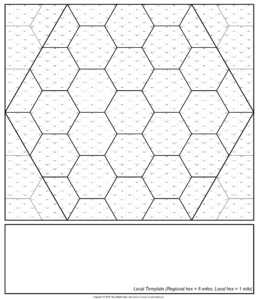
The Regional template represents a single block on the Atlas template, which measures 5 hexes square. Each of the “atlas” hexes are sub-divided into 5-mile hexes, and there’s a blank area at the bottom for the map title and key.
In the figures below, Atlas (large) hexes are listed first, with Regional (small) hex measurements in parenthesis.
- Template dimensions: 125 miles x 125 miles
- Template area: 15,625 square miles
- Hex scale: 25 miles per hex (5 miles per hex)
- Hex area: 540.6 square miles (21.6 square miles)
Sub-hex Template
The Sub-hex template represents a single hex, divided into smaller sub-hexes. This representation is useful at scales below the Regional level (largely defined by you).
Because the relationship between the large, “parent” hex and smaller sub-hexes is constant (i.e., the width of each sub-hex is one-fifth that of the parent hex), the template’s actual dimensions depend on the scale you choose. That said, you can use the sub-hex template to “zoom in” on areas of the Atlas or Regional template.
Hex Template Scales
For reference, use the table below to determine template measurements (the template has blank placeholders you can use to record the scale):
| Scale |
Large hex (area) |
Sub-hex (area) |
Map Area |
| Atlas | 25 miles (540.6 sq. mi.) | n/a | 390,625 sq. mi. |
| Regional | 25 miles (540.6 sq. mi.) | 5 miles (21.6 sq. mi.) | 15,625 sq. mi. |
| Regional [1] | 25 miles (540.6 sq. mi.) | 5 miles (21.6 sq. mi.) | ~2,162.4 sq. mi. |
| Area [1] | 5 miles (21.6 sq. mi.) | 1 mile (0.865 sq. mi.) | ~86 sq. mi. |
| Local [1] | 1 mile (0.865 sq. mi.) | 0.2 miles (0.035 sq. mi.) | ~4 sq. mi. |
Footnotes
|
|||
Downloads
The archive ZIP file below contains the hex templates outlined above, in a variety of formats: CC3 FCT file, Hexographer HXM file, and PDF. As noted on the templates, you are free to make unlimited copies for personal use.
- Welsh Piper Hex Templates – version 2.3 (1 Mar 2012; CC3, PDF, Hexographer formats, PNG versions, plus World Hex Template)


UPDATE – 1 Mar 2012
Added PNG versions of each template (version 2.3).
UPDATE – 18 Apr 2010
Added borders to Hexographer Regional and Sub-hex templates (version 2.2).
UPDATE – 3 Apr 2010
Added World Hex Template (in PDF and PNG formats only) to ZIP download (version 2.1).
UPDATE – 8 Mar 2010
Updated the Atlas hex template to be 5 regional blocks square; updated Hex Templates download to include the updated templates (version 2.0).
UPDATE – 6 Mar 2010
Updated the Hex Templates download to include the atlas templates in Hexographer format (version 1.3).
UPDATE – 11 Dec 2009
Updated the Hex Templates download to include the regional template in Hexographer format (version 1.2).
UPDATE – 21 Oct 2009
Updated the Template Scale table for clarity (because Math and I don’t always get along).
UPDATE – 19 Oct 2009
Updated the Hex Templates download to include the sub-hex template in Hexographer format (version 1.1).
I like your templates, Erin. Alas, I did not delve into CC3 as I’d set out to in my New Year’s Goals. Looks like that will be a carry-forward in 2010. Love the two maps in the latest newsletter!
Thanks, Johnn. I am working on Hexographer versions of the Atlas and Regional templates, and with a bit of time and skill, a layered PNG in GIMP or maybe Photoshop formats. Any preference?
The Regional template is now available in Hexographer format. Download the updated ZIP file (v 1.2) above to get the new template.
The Atlas templates (portrait and landscape) are now available in Hexographer format. Download the updated ZIP file (v 1.3) above to get the new templates.
I revised the Atlas template dimensions to be 5 regional blocks square. Also dropped Campaign Cartographer 2 from the Hex Template download (the CC3 templates should load in CC2; if it doesn’t work, please email me via the Contact Us form).
Just added the World Hex Template after a bit of practical application (yes, I am daft at maths). But wait until you see the tutorial…Enjoy!
Hmm, well it looks like I got distracted by another side project. Looks like your not the only one with OCD.
I’ve been inspired into making a set of templates in Inkscape 0.46 for these Erin which will allow me to map in my own peculiar mannerisms, more “drawn” than plug in. I’ve got the hexes snapping together nicely so far.
@Greg MacKenzie : Sounds enticingly geeky, Greg.
Got any samples?
@Erin Smale Why sure. I’ll send the Atlas and Regional templates along. At the moment I do not have any terrain and habitation style “hexes” drawn up, just the basis of the template.
My plan is to complete the three templates and then work on the hexes to duplicate and snap. I’ve broken things into layers which will be locked, from top down Border Text, Border, Grid (Atlas), border blanking (crops the base hexmap beyond the border), Hexmap Atlas, and finally U Draw. So the layer you’ll draw on is below everything else. The others are locked.
My intention is to subdivide the U Draw layer into sublayers Text, Icons, Terrain Icons, Roads, Rvers, Hex Colours, etc. However, I intend to include a bunch of artwork for the Icons which I haven’t done yet. I’ll probably be using my Gnomeyland artwork as the basis for that due to the fact that I want to avoid any issues and the fact that it’s just plain time to move on – YO!
The good part of all this is it will be vector art. I’ve encountered a little wierdness with the polygon tool so my hexes are not perfectly symetrical. I’ve fudged them a little to fit into a square, and by using snap to nodes, I find that if the square is subdivided into four, the hexes snap perfectly, so that lines overlap rather than adjoin. I’m using metric by the way so the hexes are approximately 1 cm, but the paper size is 11×17. Printed to pdf, or saved to PNG, it should provide very clear output. They look quite good, acceptable to me anyway.
The “icons” will be drawn in a square box or hexes, but I haven’t decided which yet. Hey, aren’t I supposed to be working on my Chimera module?
Greg
@Greg MacKenzie : OK, first off – thanks for using my Atlas and Regional templates. Second, your icons KICK-ASS. (did I say that too loud?)
Just installed Inkscape and am about to start playing with it. Great icons, Greg – these are truly inspired. Hope to produce something worthy of your work soon.
@Erin Smale
Oh, your welcome Erin. Your templates are inspired! Your not the only one with OCD. Once I get an idea in my noggin it’s hard to let go.
I’ve got this sorted out some more to the point where it’s now truly useful and I’ll send along two inkscape templates for you to tinker with, an inkscape development file within which I illustrate an example to go along with the all important tutorial in which I actually seem to explain what I’m getting at. What was I thinking?
I’m really glad you like the icons, they are based on old 19th century map icons and old map colours. The set is far from complete or finished. However, I’ve added a few more bits of art for your immediate enjoyment.
Greg
@Greg MacKenzie : You have succeeded in distracting me from my day job. Fortunately, I’m on vacation next week, so I’ll get some time to put your template and tutorial through its paces.
@Erin D. Smale
Your not the only one distracted. Serves you right for making those templates in the first place. Now my OCD is really kicking in… I’ve got to sort these icons out a bit, Gnomeyland is getting mixed up with the “historical” physiographic symbols. Plus, I’d found the maps of Hampshire, which really got the creative flow going. So I’ve sent you a link to those as well.
Hah!
OMGeezers! You and Hexographer have another convert, Erin! Seriously sweet!
Trying to load the templates into Hexographer gives an error, something about FCW… any chance these aren’t compatible with the newest Hexographer? Or am I just hopelessly lost?
Cheers for the awesome thoughts on hex design.
-Dale
@Dale : Sounds like you may be trying to load the wrong files. For Hexographer, use the *.hxm files in the download (the FCW format is a reference to Campaign Cartographer). Let me know if that sorts it.
A ha! I Was indeed loading the cc3 FCT files… the irony of it all is that I have CC as well and didn’t even notice the extension.
I like CC3 when I want to make beautiful maps… but rarely have the requisite 40+ hours to put in to a single map… happy to learn about hexographer!
Erin: Just noticed that you haven’t updated the description under the “Downloads” section of the original post. Still shows v2.2 from April 2010, though the link is to the new v2.3. Thanks for adding the PNGs, they’ll be handy indeed!
@Reese : Good catch – update made.
Hi, Erin,
I just discovered Chimera while looking at Fractal Mapper (which I can’t afford at the moment – I’m building a patio). Thank you for the free Basic (I’ve since purchased the Chimerapedia Core). I’ve been looking for just this kind of thing to reawaken the flavor of the old-school D&D that I cut my teeth on back in the day without all the unwieldy and unnecessary rules and learning curve. My partner and I look forward to making Chimera our go-to system for future games.
Also, thanks for adding the .png files, above. That saves me a step in coverting the .pdfs to .png. I look forward to using them as I create my maps, either by hand (which I’ve been doing for almost 30 years) or in Fractal Mapper when I’m able to get it.
As I create my new fantasy gaming world for Chimera, I will post creature conversions, treasure stats, and the like as updates to my world-building blog. It’s still in its infant stages – only 3 posts so far – but here’s the URL: http://rpgworldbuilding.blogspot.com/
Best wishes for the growing and continued success of Chimera.
~October
The Elusive Female Gamer
@October MacBain : October, thanks for checking out Chimera. I’m really happy to see you using it as the basis for your new campaign. I’ve added your blog to the Links section (at right) – I really like how you’re describing the setting through Chimera mechanics. Biased that I am, it’s great material!
This maybe a foolish question, but how can I use these templates with Hexographer? I really would like to utilize these, but I can’t seem to be able to load them. Thanks
@Nick : Unzip the download file. Inside, there’s a set of “HXM” files for atlas, regional, and subhex templates. Open any of these in Hexographer as a new map and have at it.